
Apache
To disable SSLv3 on your Apache server you can configure it using the following.
SSLProtocol All -SSLv2 -SSLv3
This will give you support for TLSv1.0, TLSv1.1 and TLSv1.2, but explicitly removes support for SSLv2 and SSLv3. Check the config and then restart Apache.
apachectl configtest
sudo service apache2 restart
NginX
Disabling SSLv3 support on NginX is also really easy.
ssl_protocols TLSv1 TLSv1.1 TLSv1.2;
Similar to the Apache config above, you will get TLSv1.0+ support and no SSL. You can check the config and restart.
sudo nginx -t
sudo service nginx restart
IIS
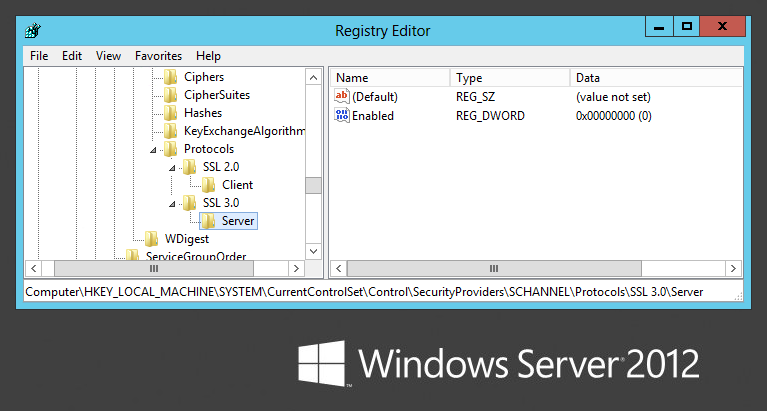
This one requires some registry tweaks and a server reboot but still isn’t all that bad. Microsoft have a support article with the required information, but all you need to do is modify/create a registry DWORD value.
HKey_Local_Machine\System\CurrentControlSet\Control\SecurityProviders \SCHANNEL\Protocols
Inside protocols you will most likely have an SSL 2.0 key already, so create SSL 3.0 alongside it if needed. Under that create a Server key and inside there a DWORD value called Enabled with value 0. Once that’s done reboot the server for the changes to take effect.
How to check your server
The easiest and probably the most widely used method to test anything to do with your SSL setup is the Qualys SSL Test. Simply navigate to the site, enter the domain for the website you want to test and hit submit to start the test.
SSLv3 goes to the dogs; POODLE kills off protocol (scotthelme.co.uk)




